Posted on
This release scheduled for August 10, 2026 includes new features, feature updates and bug fixes.
Highlights of This Release
New Functionality
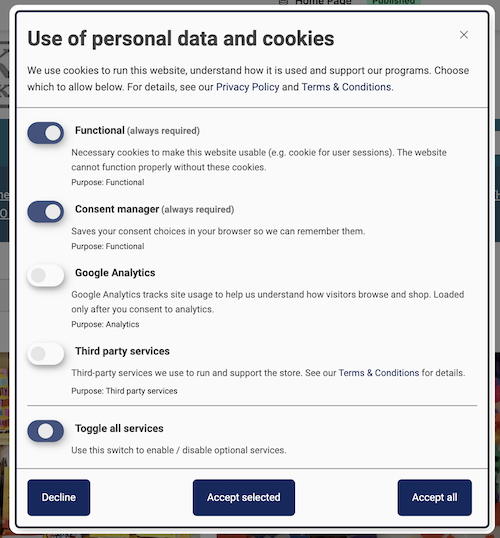
- Cookie and Consent Management - A new cookie and consent manager will be enabled on all websites. This will gate the platform's third-party scripts behind prior consent: Google Analytics under an Analytics toggle, and the marketing services (WithFriends, Book2Look) under a single Third party services toggle. Customers will not be able to opt out cookies that are required to run the website, place orders etc. IndieCommerce sites using third party services like Book2Look and WithFriends should plan to update their Terms & Conditions and Privacy Policy pages. For reference: Book2Look Privacy Policy
- Square Payment and Ingram CDF: For sites using Square for credit card payments, orders placed using credit card will be eligible for Ingram Customer Direct Fulfillment (the fulfillment option that uses ABA’s Ingram account)
Enhancements & Updates
- Fraud Rules: The following new fraud rules will be added to improve the fraud detection logic.
- The customer's IP geolocation does not match shipping and billing addresses: 5 points
- Order created by store staff: -20 points
- Customer account created within 3 hours of the order placement time: 1 point
- Phone number area code does not align with shipping and billing addresses: 2 points
- Reports and Batch API: All reports that include large order volumes with multiple order statuses and order products will utilize Drupal’s Batch Processing approach to avoid timeouts and performance issues. Reports included in this update are Sales Summary, Custom Sales Summary, Sales Per Year, Product Sales Summary and Weekly Bestseller. Other reports were already being generated using batch processing.
- Illustrators for Books: The illustrator name, where available (mostly children’s books), will be listed with the author name for search results, browse books, product lists, blogs, event related titles. The illustrator was previously displayed on the book product page.
- Date Format for Admin Pages: Date format for customer facing pages were addressed in a previous code update. A similar fix (removing leading zeroes in date and time format) will be applied for admin facing pages as well.
- Bulk Upload of Store Merchandise: More updates to bulk upload of store merchandise, specifically addressing image uploads
- Tax Report - Tax Report will include the street address and city associated with the order (as requested by many stores). This information will be available for future orders.
- BLK Bestsellers List - The banner is updated to match the other ABA curated lists.
Bug Resolutions
- Tax Exempt Customers: Resolves the following 2 bugs
- When a store rejected a customer's tax-exempt request and the customer fixed their details and resubmitted, nothing happened. The updated submission was not processed.
- Uploading the exemption PDF triggered a "Password field is required" error that blocked the save for customers who weren't changing their password and the store admins were falsely notified.
- Image Row 2 for Tier 1 Sites: Image Row 2 is a Tier 2 feature and will be removed from the homepage configuration for Tier 1 sites
- Spaces in Address Fields: When customers accidentally include a space while entering the billing and shipping addresses, the ‘billing and shipping addresses don't match” warning was triggered interfering with address validation and fraud detection. Spaces in the address fields will be trimmed to avoid such false warnings.
- Modal Pop-ups: Will fix the modal popups across the platform that currently look cropped on iPad and mobile devices. This includes modal popups for credit cards, wishlists, registries and newsletter signups
- Optional Preference Form Fields: For product types that support preference form fields (store merchandise, services, subscriptions, variations), a field can be optional. When customers skip the optional field, their selections for the subsequent fields were not saved during checkout. Labels for optional fields will also be listed with a ‘-’ for value as part of addressing this issue.
- Gift Cards and E-Gift Cards: When a Gift Card or E-Gift Card is added to the cart, the display order of From, To, Delivery Date, and Message will be consistent across all the checkout pages and on the order.
Categories