IndieCommerce 2.0 Release Notes

This critical code update delivers highly requested features and important bug fixes, while also preparing our platform for the upcoming Drupal 11 upgrade. Here's a preview of what's included:

New Features

POS Stock and Website Stock: We're introducing "Website Stock" for managing inventory of non-book items online, similar to the "Stock" feature from the legacy 1.0 platform. This new option allows you to manage website-specific stock, differing from "POS Stock" (formerly "Local Store Inventory" or "LSI"). POS Stock is primarily used for books to synchronize in-store inventory with the website, but can also be used for non-book items.

POS and Website Stock

Stores can now enable both POS Stock and/or Website Stock for non-book items. The primary selection is made under Fulfillment Settings (Dashboard > Commerce > Fulfillment Settings), with more granular control available at the product level. Please verify your selections by checking a few products on your site.

Website Stock config

POS Stock (previously LSI)

  • No functional changes in this release.
  • Can be uploaded multiple times a day via FTP, Above The Treeline, or manual upload.
  • Applicable to books and non-book items (e.g., store merchandise, non-shippable merchandise, services, book variations).
  • Product availability on the website is determined by the uploaded LSI file and associated configurations.
  • On-hand numbers are updated from the uploaded file and are not decremented as orders are placed.

Website Stock (New in this release)

  • Exclusively for non-book items (e.g., store merchandise, non-shippable merchandise, services, book variations); not an option for books.
  • Allows setting an on-hand stock number and a notification threshold for stores.
  • On-hand stock numbers automatically decrement as orders are placed.
  • When stock reaches zero, the product is marked "Out of Stock" (customizable message) and cannot be purchased.
  • An email notification is sent to store staff when stock drops below a predefined threshold (thresholds can vary per product).
  • Bulk upload is not currently available.

Book Variations with Additional Preferences: We've enhanced Book Variations by incorporating an important property from Service into it. This improvement facilitates use cases like School Visit Books and Author Signings by allowing the inclusion of preference fields in a signed book variation.

Book variations

Feature Updates:

Order Confirmation Email to Store Admins: The order confirmation email for store staff has a slightly modified template:

  • The order number now links directly to the order page on the website.
  • The "Thank You" message has been removed.
  • If the LSI file includes the store section for the book, it will now be included in the email.

Stores can disable these confirmation emails for store admins if preferred.

Editing Migrated Orders: Migrated orders can now be edited to some extent, streamlining processing and completion for stores. You can add or remove order tags, modify shipping addresses, and add shipping tracking numbers.

Bug Fixes:


Inventory and Order Management

  • Accurate LSI Stock Display: Books reported in stock by LSI files will now display the correct availability message. This resolves previous issues where LSI books incorrectly showed "out of stock," and stock information was inaccurate in the Pick List and Stock table.
  • Checkout: An issue resulting in missing order numbers during checkout has been addressed.

User Experience and Data Management

  • Truncated Book Descriptions: Book descriptions on the search results page are now truncated to 300 characters. Truncation will not affect search results if it occurs mid-tag (e.g., `<pr>` or `<b>`).
  • Improved Customer Email Validation: Validation for customer emails has been enhanced.
  • Custom Sales Summary Report Accuracy: The Custom Sales Summary Report will now return accurate results when filtered daily, weekly, monthly, or yearly.

Performance and Stability

  • LSI File Uploads: Improved the reliability of manual upload of LSI files.
  • User Account Bulk Uploads: Bulk upload of user accounts will now complete without timing out.
  • Removed Double Spacing: Double spacing has been removed from Site Alerts and Announcements.

New and Updated Features

 Additional Search Form: A third search form option is now available for placement anywhere on the homepage, from below the header to just above the footer. This placement is adjustable by editing the homepage. This is a Tier 2 feature. The website design currently offers four header options with integrated search forms, plus a secondary search form for the homepage (mid-product lists) and browse book pages. 

Search Form


 Manage Availability of Non-Book Products: You can now quickly remove the "Add to Cart" button for any non-book item (shippable/non-shippable merchandise, services, subscriptions, gift cards, etc.) by enabling the "Out of Stock" setting and configuring the "Button Label." This setting overrides Local Store Inventory preferences and "Always available for purchase" preferences, allowing for quick disallowance of purchases.

out of stock


Site Alerts and Announcements: Enhanced text formatting (bold, italic, underline, links, numbered/bulleted lists, text alignment) is now available for Site Alerts and Announcements. Announcements have also been repositioned below the header (away from Site Alerts), given a white background, and a border to improve visibility. Stores are requested to edit and resave existing and future Alerts and Announcements with proper alignment. Dashboard > Manage > Site Alers / Announcements
 Staff Review Tags and Filter: Managing staff reviews is now easier with the display of review tags on the "Manage Staff Reviews" admin page and the ability to filter reviews by tags.

staff reviews


Date - 12 Hour Format: The date format across the site has been changed from 24-hour to 12-hour format.

 Event Carousel: Homepage event carousels can now be created for multiple event tags per carousel. Events in the carousel can also be limited to only those promoted to the homepage.

Event Carousel


Gift Card Owner Distinction: A clear distinction is now made between the gift card "owner" and the administering staff. The "owner" (if applicable) is the customer who can redeem the gift card for online purchases, and their email appears in the "Owner" field. The email address of the admin or store staff who create, disable, or update transactions on gift cards appears in the "Created by" or "Transaction created by" field.

 Order Comment to Customers: The "comment to the customer" field within the admin view of an order now supports enhanced text formatting, including bold, italic, underline, links, numbered/bulleted lists, and text alignment.

order comment


Minor Updates and Bug Fixes

  • The INL Logo is now correctly displayed on all book variation product pages, with or without the inscription field.
  • Custom URL aliases are now validated to prevent the creation of multiple events with the same URL alias.
  • Store merchandise can now be uploaded in bulk with up to 5 images per product. Image URLs for external sources should be included in the upload file.
  • The Recurring Events feature has been updated to work with the Scheduler feature, which was added in the May 2025 code update to schedule publishing and unpublishing of content.
  • For non-book products (gift cards, e-gift cards, donations, subscriptions), the minimum required image size has been reduced from 800px to 400px to improve product page layout.
  • Order confirmation emails for orders created by store staff will now display the customer's name, not the staff's name.
  • For the Manage Orders BETA, the Order Tag filter will stay col

New and Updated Features

Drupal Commerce 3.0.2 : The e-commerce platform for Indiecommerce 2.0 has been upgraded to the most current release, ensuring up-to-date functionality.

Bug Fixes

Sales Tax by State : The report used to determine out-of-state sales volume for nexus purposes now generates for various date ranges without timeouts
Orders with missing numbers : All orders will receive an order number immediately upon completion of the checkout process.

New and Updated Features

  • Content Scheduling: Schedule the publishing and un publishing of Pages, Product Lists, Landing Pages, Events, Blogs, and Staff Reviews by specific dates and times via Scheduling Options in the right sidebar. Scheduling by date (and not date & time) is recommended for accuracy. 
  • Daily Recurring Events: Create event instances spanning multiple consecutive days with the same start and end times. For example, an event from Friday to Monday can be set up to automatically generate individual event entries for each day. 
  • Wholesaler Discounts: Expanded wholesaler discount pricing options now include 5% intervals (e.g., 30-34%, 35-39%) for more precise control over discounts and markups. This can be configured under Dashboard > Commerce > Fulfillment Settings > Store Pricing by Wholesaler Discount Category.
  • Promotions & Coupons: Enhanced options allow for creating promotions and coupons that apply a fixed amount or percentage discount to either the cheapest or the most expensive item in an order. This can be set up in Dashboard > Commerce > Promotions & Coupons > Add Promotion > select Offer Type.
  • Fraud Detection: Improved fraud detection now flags orders as suspicious if the IP address location doesn't match the shipping and billing addresses.
  • New Reports:
    • Sales Tax by State: Identify out-of-state e-commerce sales volume to help determine sales tax nexus. This report is available under Dashboard > Commerce > Reports > Sales Tax by State Report.
    • Paypal Transactions Report: Reconcile daily Paypal captures and refunds with online Paypal transactions. This report is available under Dashboard > Commerce > Reports > Charge Report > Paypal Transactions Report.
  • ShippingEasy Integration: Stores using ShippingEasy can now export order information as a CSV, upload it to ShippingEasy for label generation, and upload tracking numbers back to the website to update orders This can be enabled under Dashboard > Commerce > E-Commerce Settings > Shipping > Shipping Services. A ShippingEasy link will be added to the Manage Orders page.
  • Gift Registry Updates:
    • Gift registry owners can now customize the subject and message of the email sent to recipients when sharing their registry link.
    • Site admins viewing wishlists or gift registries will see additional details (ISBN, Author, Price) for each item in the admin view, which is also included in CSV downloads.
  • Custom Checkout Panes: Stores can now add up to five customizable checkout panes with Yes/No input options. This feature can be enabled under Dashboard > Commerce > E-Commerce Settings > Custom Checkout Panes > Additional Options.

Minor Updates and Bug Fixes

  • Order Managers can now create orders for customers.
  • Order Managers and Content Editors can update book / product stock directly on the product page.
  • The title of catalog category pages will no longer appear multiple times when added to an existing catalog.
  • The ‘Show Badges’ checkbox on catalog category pages now correctly displays badges (Preorder, New Release, Staff Pick, or Discounted) for books in the catalog.
  • Tier 1 sites can flag individual books as signed copies via a checkbox in the Author section while editing the book.
  • Order Activity entries are now sorted by Log ID to ensure proper chronological order.
  • Conditions can be added to the Authorize.net Payment Method settings to allow or prevent credit card payments for specific order types (e.g., allowing credit cards only for US billing addresses).

Introducing Beta Features

A beta version of the redesigned Manage Orders admin page is being introduced for feedback. While visually similar to the current version, it features a new architecture for improved efficiency and future updates. Stores interested in being part of the beta testing group can contact staff@bookweb.org.


New and Updated Features


Bookshop.org eBooks

Integrate Bookshop.org eBooks into your IndieCommerce 2.0 website to provide ebooks to your customers. Enable this feature in Dashboard > Site Settings > Affinity Partner Integrations, and enter your Bookshop.org Affiliate ID. If you don't know your store's Bookshop.org Affiliate ID, please contact Bookshop.org. Once enabled, available ebook formats will be displayed under 'Available Formats' on the book's product page.

Bookshop.org eBooks


Drupal Core Update

Drupal has been updated to version 10.4.6.


Bug Fixes


Product Lists

When adding multiple Store Merchandise with Variations and Services with multiple fields to a product list, fields are now correctly validated and the correct values are added to the shopping cart.


Sales Report by SKU

Reports for unrecognizable SKUs no longer display a white page error, and duplicate columns have been removed.


Subscriptions and Services

When an Address field is included in these forms, only the countries allowed on the site will be listed as options.

New and Updated Features


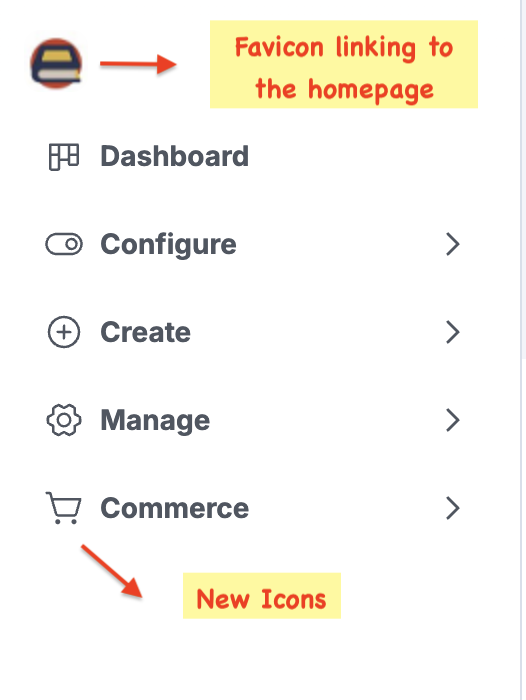
Admin Navigation

The left navigation has been redesigned with improved icons.

navigation menu


Product List

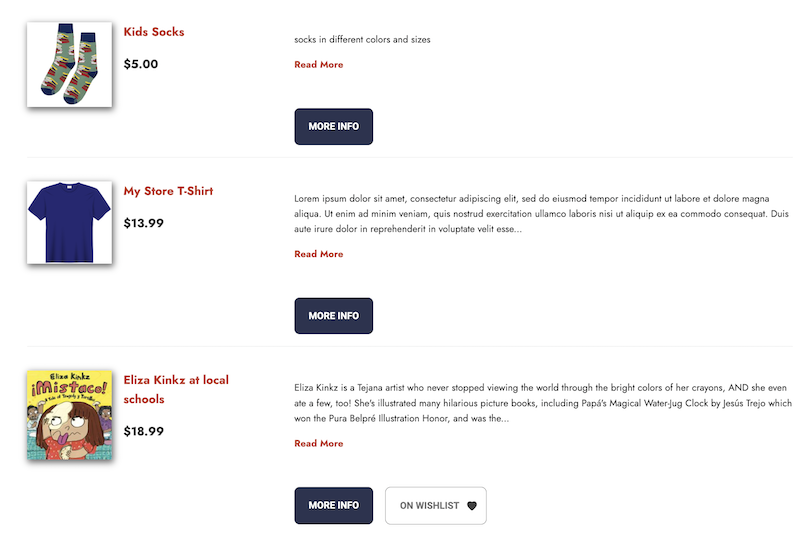
Stores now have more control over how store merchandise and services are displayed when added to a product list.

Store Merchandise with Variations: When a t-shirt with variations is added to a product list, stores can now choose to display it using the base product title and replace the "Add to Cart" button with a "More Info" button. Customers can click the "More Info" button to go to the t-shirt product page, select the desired variation, and add it to their cart. The current behavior of listing all variations is still available for stores that prefer it. The two options can be toggled using a checkbox on the product list settings.

New configuration options in a product list for store merchandise

product list configuration

New look for the product list

updated product list


Services: A similar configuration is available for service products. By enabling a setting, the "Add to Cart" button is replaced with a "More Info" button, which links to the service product page. When disabled, service product fields are visible on the product list with the "Add to Cart" button, allowing customers to add multiple services to their cart without being redirected to individual service pages.

Configuration option in a product list for services

configuration for services


Showing full service product


Book Descriptions

When books are added to a product list, the truncated book description will now preserve the formatting from the full description data, including line breaks, paragraphs, and bold text.

product list


Order Shipments

When creating multiple shipments for an order, order items that have been shipped or already included in one shipment will be grayed out or unselectable when creating subsequent shipments.

shipments


E-Gift Cards

Several updates and improvements have been made to the built-in E-Gift Cards feature.

General cleanup to the admin interface.

When generating gift cards in bulk, an option to download the codes as a CSV file will be available as soon as the codes are generated by the system.

A downloadable E-Gift Card Balance Report with the option to filter by balance.

A Balance and Transaction History page to easily check the balance and transaction history of an e-gift card.

Option to customize the email sent to the recipient of the E-Gift Card

   Dashboard -> E-commerce Settings -> Notification Emails -> Gift Card Emails

e-gift cards


Fraud Detection 

The fraud detection rule that generates the warning "User has completed orders with different IP addresses" for guest checkout orders has been updated to reduce false warnings.


Credit Card Payment using Authorize.net Payment Gateway

Several improvements have been made.

The Credit Card Charge Report will now include refund transactions along with capture transactions.

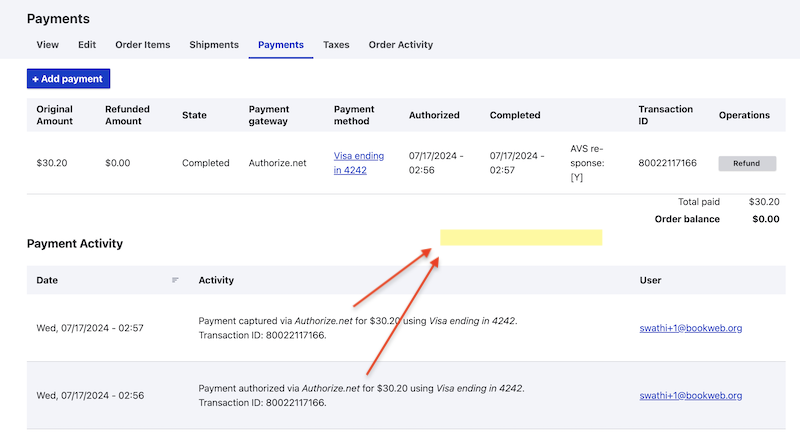
All payment-related activities will be available on both the Payment tab of an order and under Order Activity.

The message displayed when a credit card transaction is canceled has been updated.

payments tab


Incorrect Shipping/Billing Address

Store staff will now see a message when processing an order if the shipping or billing address is incomplete or incorrect.

address validation


Reports

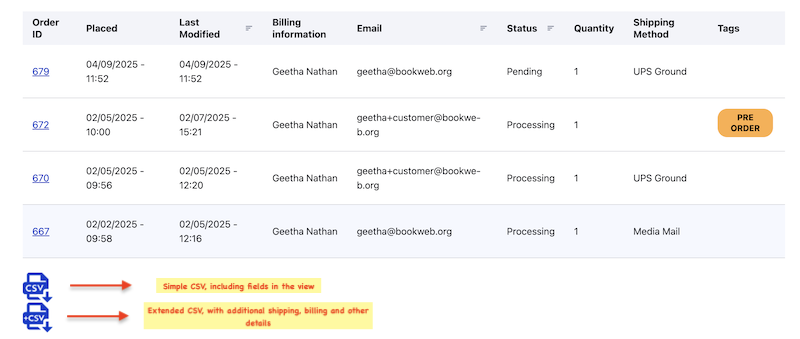
The Sales Report by SKU now has two download formats: CSV and +CSV (extended report with additional order details).

The Sales Report has been updated to include the Payment Completed Date.

sales report by sku


Promotions and Coupons

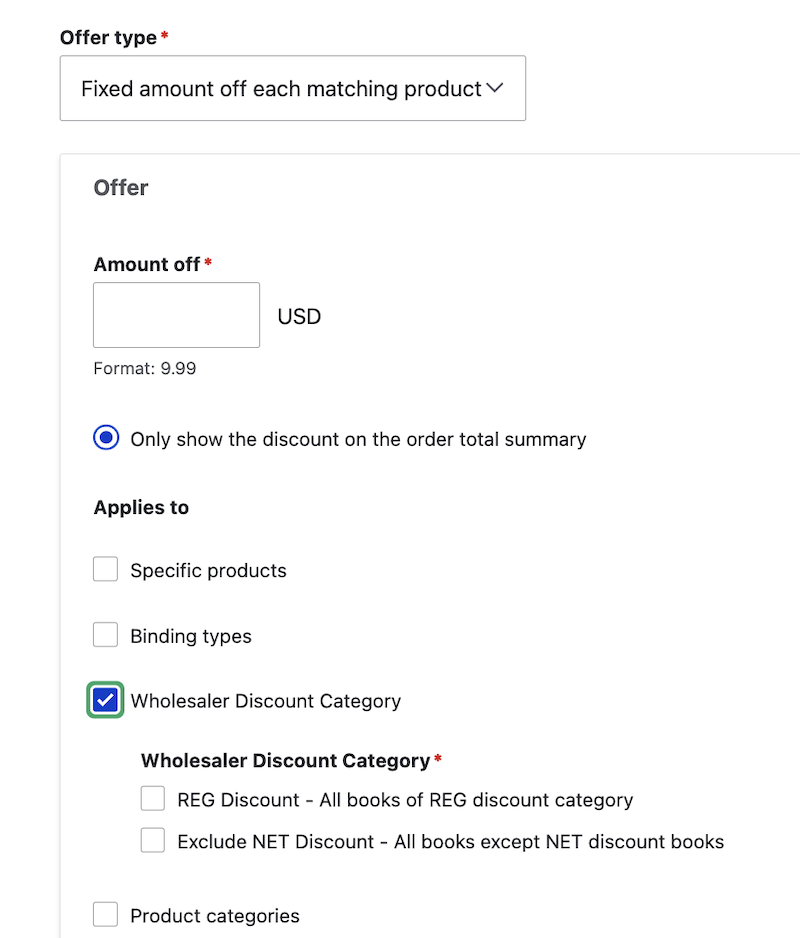
Two promotion/coupon options from 1.0 are now available in 2.0.

Option to offer coupons for REG discount books.

Option to exclude NET discount books from a promotion/coupon.

promotions and coupons


Tax Exempt

When a customer submits a tax exemption request from their account page, a store staff will receive a notification email. The recipient of the email is the address listed under Site Settings -> Order Email Address.

New and Updated Features

  • Independent Bookstore Day (IBD) 2025: IBD 2025 will occur on Saturday, April 26. Participating stores can start promoting IBD exclusives on their websites by mid-next week. A webinar about preparing your website for IBD 2025 will take place on Thursday, March 20. Register for the webinar
  • Event Date: The day of the week has been added to the date format.
  • Updating order tags, admin comment, and order comment: Editing an order to add order tags, admin comments, and order comments no longer requires several clicks and reloading of the order each time.
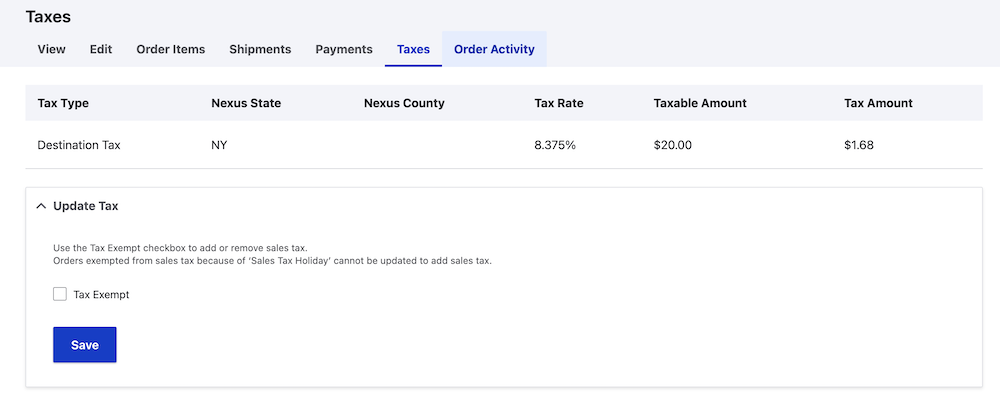
  • Tax Exempt Orders: The tax-exempt status on an order can be updated while processing the order, from the 'Taxes' tab on the order. 
Tax Exempt Screen


  • Deleting Shipping Methods: A validation has been added to prevent the deletion of shipping methods that were used on orders to avoid critical errors.

Bug Fixes

  • Search Category: The placeholder message in the search form field is updated to reflect the selected category.
  • Gift Card column on the Manage Orders page: The Gift Card column will be included in the Manage Orders page when any of the gift card types are enabled on the website. ​
Manage orders view


  • Media Mail for Book Variations: The Media Mail Eligible condition for shipping methods will now include book variations, in addition to regular books.


New and Updated Features

  • Price Source for Books: For many books, IndieCommerce receives metadata from Ingram, and directly from the publisher or distributor of the book. Sometimes, the list price provided by each data source is different. Stores can now choose which list price they prefer to use on their website when data is available from more than one source (Ingram, Publisher, or Highest Price). The setting (site wide setting, not per book) is available under Dashboard > Commerce > Fulfillment Settings > Wholesaler Settings > List Price Preferences.
  • Libro.fm Digital Audio Books: The customer experience on the IC 2.0 site has been improved to clarify which format is being purchased when buying a Libro.fm digital audio book. When the Libro.fm Digital Audio Book format is selected, the "Add to Cart" button will change to a "Buy the Digital Audio Book" button.
  • Credit Card Payment: When a customer selects "Credit card" payment, the help text "(New CC - Credit card information will be collected at the end of checkout)" will appear.
  • Checkout Steps: During checkout, on the 'Review' page, additional text “Review your order and if correct, continue to complete the purchase. Use the Go Back link to make any necessary changes” will appear to guide the customer, and the Coupon and Gift Card forms are removed to move the 'Pay and Complete Purchase' button further up.
  • Newsletter Signup Forms: For all available integrations (MailChimp, Constant Contact, My Emma and Brevo), the Name field on the newsletter signup form is now split into First Name and Last Name fields to match the fields on the vendor’s end.

Bug Fixes

  • List Prices: List prices for books will be updated frequently to keep up with changes with the publisher or Ingram. Ingram stock and price updates will be checked every 4 hours.
  • ISBN Search: When searching for a book by ISBN (standard 978 or 979), any spaces or non-numeric characters will be trimmed to make the search successful. No need to worry about spaces or hyphens when copying the ISBN.
  • Service Products: When purchasing 2 of the same Service product (e.g. School Visit Book) with different values (e.g. Student’s Name) in the same order, the 2 Service products will remain as separate items in the order.
  • Credit Card Charge Report: The column heading 'Authorize.net Order ID' is changed to 'Authorize.net Invoice Number' to match the terminology used in Authorize.net
  • Saved Credit Card Profile: Customers can always delete their saved credit card profile from their account on the website. If a customer deletes the credit card profile that is used in their current cart, they will be prompted to enter new credit card information.
  • Gift Card Refund: When a gift card is used to pay for an order (partial or full), order processing staff - Site Administrators and Order Managers -  will be able to refund the gift card from the order page.
  • POS Order Exporter: The file has a column for Billing Phone and a column for Shipping Phone. Billing Phone will list the phone number from the user profile if it exists, otherwise it will list the phone number from the contact information on the order. Shipping Phone will list the phone number from the contact information on the order.